Feature · DNO approval letters
Your DNO approval letter, read for you.
When the DNO approves, the CLRD engine reads the letter and fills in the reference and any export limit. Confirm it, and one click sends it to your client.
What it is
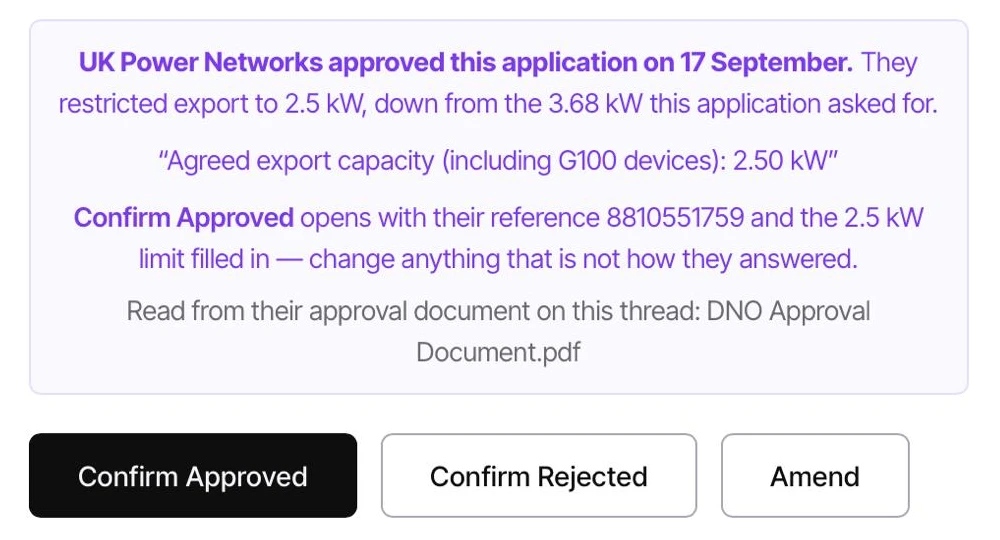
DNO approvals come back by email, usually as a PDF letter, onto the job's own thread. CLRD recognises an approval letter from National Grid, SSEN, UK Power Networks and Northern Powergrid, reads it, and tells you on the job what the DNO actually said, quoting the line from their letter and naming the document it read. This isn't AI guessing at a PDF: the reading is coded, so the same letter reads the same way every time. When you press Confirm Approved, the DNO reference and the export limit, if the letter sets one, are already filled in. Once you have confirmed it, one click sends the approval letter to your client, so they have it without you forwarding anything.
Why it matters
The approval is where a job most often stalls in an inbox. Someone has to spot the letter, open it, find the reference and check whether the DNO has capped the export, then key it all in. Miss a capped limit and the paperwork after the install states the wrong figure. Then the client wants to know if they're approved, and someone has to forward the letter. CLRD does the reading and has the letter ready to send. You confirm, and click.
No more reading a PDF to copy a reference into a box.
- Approval letters are recognised on the job's DNO thread.
- The job page tells you an approval has arrived, in plain words.
- Coded, not AI. The same letter is read the same way every time.
- The DNO reference is filled in from the letter.
- Approved at a lower export limit than you asked for? CLRD says so, quotes the line from the letter, and fills in the figure, so commissioning states the limit you were granted.
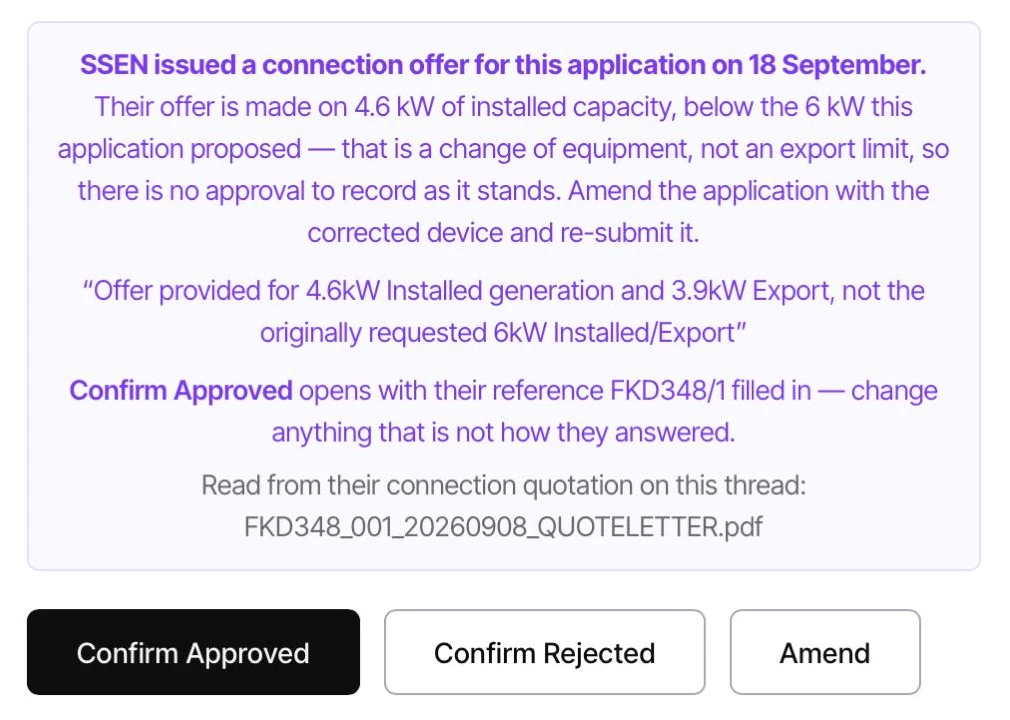
- A connection offer on different equipment isn't treated as an approval. CLRD tells you there's nothing to record yet and points you at Amend.
- Every banner names the document it was read from, so you can open it and check.
- You still press Confirm Approved. Nothing is recorded without you.
- Confirmed? One click sends the approval letter to your client.
- Today: National Grid, SSEN, UK Power Networks and Northern Powergrid. Other operators' approvals are recorded by hand, as before.
In practice
What changes on the next job.
Nothing missed
An approval sitting in a thread is flagged on the job itself, with the line that matters quoted.
No retyping
The DNO reference comes straight off the letter.
The right export figure
A capped approval is caught, and the granted limit carries through to commissioning.
Coded, not AI
Written for each letter, so it reads the same way every time. Nothing is guessed.
Your client kept in the loop
Confirm the approval and one click sends them the letter. No forwarding, no chasing.
You stay in charge
CLRD fills it in. The approval is recorded when you confirm it.
Before & after
With CLRD vs. without.
See the CLRD engine read your next approval letter.
A 20-minute demo with a real install, yours or ours.