Feature · Commissioning and sign off
Whoever commissioned it, signs it.
The person who actually commissioned the installation signs the declaration, in app, by their own signing link, or as an external commissioner under their own company and role.
What it is
Post install commissioning, signed by the person who actually did it. Record it yourself, send a teammate their own signing link, or text or email an external commissioner a link to sign under their own company and role. Every declaration prints that commissioner's name, role and company.
Why it matters
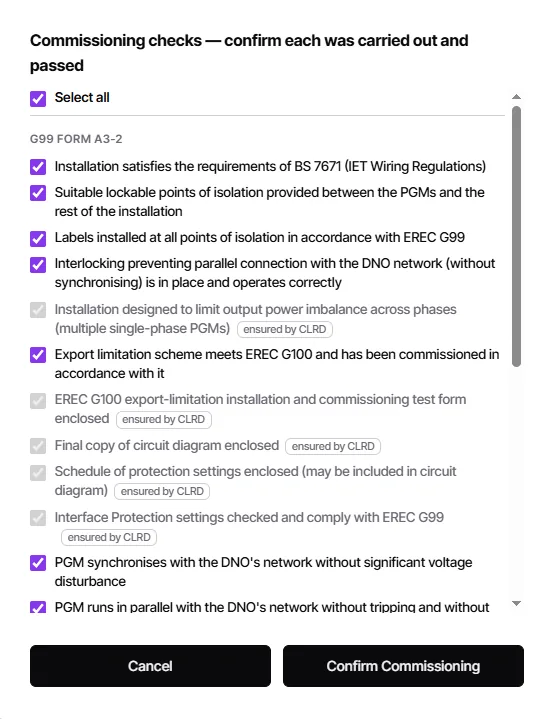
A commissioning declaration is a personal attestation, so it should be signed by the person who carried out the work, not typed in by whoever happens to be at the desk. CLRD walks the signer through the real checklist pulled from the generated forms, with the checks your pack already guarantees pre ticked and marked, so nothing is attested unseen and the finished record stands up at audit.
For teams where the installer, the commissioner and the account holder are not the same person.
- Sign it yourself, send a teammate a link, or send an external commissioner a link.
- Name, role and company printed on the declaration.
- The real checklist from your generated forms, itemised check by check.
- Checks the pack already guarantees are pre ticked and labelled.
- A commissioning requests inbox, so nothing sits forgotten.
- A per member permission keeps non commissioning staff out of the flow.
 Enlarge
In practice
What changes on the next job.
The right signature
The person who commissioned it is the person who signs it.
Nothing attested unseen
Every check is itemised and confirmed, not a single tick box.
Works with outside teams
External commissioners sign under their own company and role.
Before & after
With CLRD vs. without.
See commissioning and sign off on your own jobs.
A 20-minute demo with a real install, yours or ours.