Feature · Multi premise batches
One batch. A whole development.
Enter the client and the system once, list the premises, and every plot gets its own job, its own paperwork and its own audit trail. Fifty houses take about as long to set up as one.
What it is
Create one batch instead of dozens of near identical jobs. One client, one shared system configuration and a list of premises. CLRD fans it out into a standalone job per premises, each with its own site, MPAN and documents, and you sign and draw the diagram once.
Why it matters
A housing development is the same install repeated down a street, but the paperwork treats every plot as a fresh job. That is where the hours go, and where a mistyped MPAN or a mismatched diagram slips in. Batches let you configure the system once and let CLRD produce a correct, complete job for every premises, then generate, submit and mark installed together.
For housing developments, retrofit programmes and anyone submitting the same install many times over.
- One client, one system configuration, a list of premises.
- A standalone job per premises, each with its own site, MPAN and documents.
- Routed G98 or G99 as each job requires.
- Where the premises form one close geographic region, the shared G98 Form A is produced for all of them.
- Sign and draw the diagram once, generate and submit together.
- Available on Small Team plans and above.
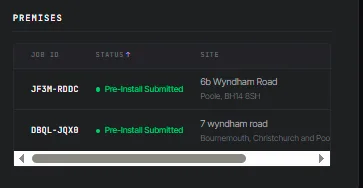 Enlarge
In practice
What changes on the next development.
Configure once
The shared system is entered a single time, not per plot.
Still a real job each
Every premises keeps its own site, MPAN, documents and audit trail.
Built for programmes
Developments and retrofit schemes without the per plot admin.
Before & after
With CLRD vs. without.
See multi premise batches on your own jobs.
A 20-minute demo with a real install, yours or ours.